
In today’s marketplace, collecting customer opinions is one thing, and making sense of them is another. That’s why businesses of all sizes are turning to dedicated customer feedback tools and software to capture, analyze, and act on the voice of the customer. For restaurants, hotels, salons, and other local businesses, this shift is especially important. Instead of relying on guesswork, you can build a system to turn feedback into growth.
In this guide, you’ll explore the best tools available — both free and paid — to help you manage feedback intelligently. We highlight the criteria for choosing the right solution and best practices for launching. By the end, you’ll know which feedback solution fits your business and how to get started.
What “customer feedback tools and software” means in 2026
The term customer feedback tools and software refers to a broad set of technologies and platforms that enable businesses to collect customer opinions, reviews, suggestions, and experiences, then turn that data into actionable insights. In 2026, the emphasis has shifted: it is not enough simply to push a survey. You want real-time interaction, multi-channel collection (in-store, mobile, web), AI-powered analysis, and dashboards that tie feedback to metrics like retention, repeat visits, and word-of-mouth.
For a local business, the right feedback tool helps you capture what your diners, guests, or clients are truly thinking, rather than what you assume. The tools now include QR-code scanning, live dashboards, sentiment tagging, feedback segmentation, review monitoring, and integration with your POS, CRM, or booking system. The result: you don’t just collect feedback — you make it usable.
Why businesses (especially local ones) need both free & paid options
Small and local businesses often face tight budgets and limited resources. The good news is that many feedback tools today offer free tiers, ideal for getting started. At the same time, paid plans unlock advanced features: deeper analytics, multiple locations, real-time alerts, integration with other systems, and user roles for staff.
Why this is important:
- Free plans allow you to test the system, understand your customers better, and build a culture of feedback without financial risk.
- Paid plans provide scale, actionable dashboards, multi-location capability, segmenting, and advanced workflow automation, all of which become valuable as your business grows.
For local business owners, starting with a free plan and upgrading when you need more sophistication is often the most practical path.
How this list is organized
We begin with our featured tool: Insight IQ Hub — chosen for its strong focus on local businesses like restaurants, hotels, and salons. After that, we present the remaining 19 tools in order of usefulness, broader coverage, and ability to serve both free and paid needs. Each entry includes an overview, plan details, key features, ideal use-case, strengths, and limitations. Finally, we offer a checklist of what to look for in a feedback tool so you can pick the right fit for your business.
What to look for in a feedback tool (features, pricing, integrations, scalability)
Before you dive into tool selection, keep these core criteria in mind:
- Feedback collection channels: Does the tool support in-store QR codes, mobile, web forms, review monitoring, social listening?
- Analysis and insight generation: Can the platform segment feedback by theme, run sentiment analysis, tag responses, and show trend dashboards?
- Action workflow and alerting: Does it allow you to assign follow-up, track ownership, set deadlines, and monitor actions taken?
- Integration capability: Can it connect with your CRM, POS, booking system, review sites or messaging apps? This is especially critical in local businesses with varied systems.
- Pricing and value: Free tier? Paid plans? Are upgrades affordable for your budget and aligned with growth stage?
- Scalability and user-roles: If you have multiple locations, staff roles, or expansion plans, the tool should scale accordingly.
- Local business suitability: Does the tool support the kinds of touchpoints relevant to restaurants, salons or hotels (in-store, mobile, quick feedback loops)?
Use these criteria as your evaluation framework when choosing between feedback tools.
Best Customer Feedback Tools at a Glance
| Category | Feedback Tool | Starting Pricing (Per Month) | Best For | Rating (Out of 5) |
|---|---|---|---|---|
| Featured Local Business Tool | Insight IQ Hub | Free plan available | Local businesses (restaurants, hotels, salons) that need in-store QR feedback | 4.8 |
| All-in-One CRM Integration | HubSpot Service Hub | Free tier; paid plans from $20 | Businesses using CRM-driven feedback and support workflows | 4.5 |
| Survey Platform | SurveyMonkey | Free tier; paid plans from $25 | Data-driven teams that need templates and analytics | 4 |
| Conversational Feedback | Typeform | Free tier; paid plans from $25 | Businesses that prefer visual, interactive surveys | 4.5 |
| In-App & Website Feedback | Qualaroo | Paid plans from $80 | SaaS and website-based businesses needing behavioral targeting | 4 |
| All-in-One Feedback & Ticketing | Zoho Survey | Free tier; paid plans from $25 | Teams using Zoho ecosystem or needing simple NPS tracking | 4 |
| Multichannel Feedback | Survicate | Free tier; paid plans from $53 | Marketing teams tracking user sentiment across channels | 4.5 |
| Enterprise CX Platform | Medallia | Custom pricing | Large enterprises with complex customer journeys | 4.7 |
| Product Feedback Analytics | UseResponse | From $49 | Product-based businesses needing advanced insight automation | 4.5 |
| Team Collaboration | GetFeedback | Custom pricing | Customer service teams managing multi-channel feedback | 4 |
| Micro-Survey Platform | Wootric | Free plan; custom pricing for teams | Quick NPS and CES collection across touchpoints | 4.5 |
| Enterprise-Grade Analytics | Qualtrics XM | Custom pricing (Enterprise) | Large-scale organizations needing advanced analytics | 4.7 |
| Basic Survey Tool | Google Forms | Free | Small businesses gathering basic feedback easily | 4 |
| Website Feedback + Demographics | UserReport | Free | Bloggers and SMBs gathering insights with limited budgets | 3.5 |
| Widget-Based Feedback | Feedbackify | From $19 | Website owners needing simple pop-up feedback | 3.5 |
| Drag-and-Drop Surveys | Formstack Surveys | From $50 | Teams needing automation and branded conditional surveys | 4.5 |
| Conversational Surveys | SurveySparrow | Free tier; paid from $19 | Businesses seeking engaging survey experiences | 4.5 |
| NPS-Driven Feedback | AskNicely | From $79 | Customer-centric companies focused on loyalty improvement | 4.5 |
| Advanced Multichannel CX | InMoment | Custom pricing | Enterprise brands collecting feedback from multiple touchpoints | 4.7 |
| Hybrid Feedback Platform | Feedier | Free plan; paid from $30 | Small and mid-sized businesses needing flexible, gamified feedback | 4.5 |
Top 20 Best Customer Feedback Tools and Software
1. Insight IQ Hub

A feedback tool built especially for local businesses such as restaurants, hotels and salons. It enables in-store QR feedback, a real-time dashboard and segmentation by service line.
AI Features:
- AI-driven sentiment analysis of open-ended feedback
- Smart suggestions for improvement and growth.
Top Features: QR code feedback collection at touchpoints; dashboard showing trends and hotspots; segmentation by location/service; ability to act on insights quickly.
Best For: Local businesses looking to turn customer feedback into actionable improvements in-store and across multiple branches.
Pros: Designed for the local business environment; real-time insights; targeting in-store touchpoints; free plan/no credit card required.
Pricing: Free plan available; paid tiers unlock multi-location, advanced filters, sentiment tags (details upon registration).
2. HubSpot Service Hub

A service and customer feedback module within the HubSpot ecosystem. It integrates feedback surveys with CRM and service workflows.
AI Features: In the Enterprise tier, the “Breeze AI” suite supports automated ticket resolution and predictive insights.
Top Features:
- CSAT, NPS, CES survey support
- Integration with CRM and service workflows
- Dashboards showing customer feedback and support metrics.
Best For: Small to mid-sized businesses already using or planning to use HubSpot for marketing/sales/service alignment.
Pros: Strong integration with CRM, unified customer view; robust survey and feedback analytics in higher tiers.
Cons: The most powerful feedback features (AI, advanced workflows) appear in higher cost tiers; may require onboarding for full use.
Pricing: Free tier available (basic tools); Starter at approx. $9/user/month; Professional from ~$90/user/month; Enterprise from ~$150/user/month (annual billing)
3. SurveyMonkey

A well-known survey platform that supports extensive survey creation for feedback collection, ranging from customer feedback to market research.
AI Features:
- “Build with AI” functionality to generate surveys quickly
- Supports text analytics and sentiment.
Top Features:
- 500+ templates
- Unlimited questions on paid plans
- Logic-jump and branching
- Multi-language support.
Best For: Businesses that require flexible, powerful survey capabilities and have the resources to manage and analyze large volumes of response data.
Pros:
- Very feature-rich
- Strong integrations
- Good for market research and complex survey needs.
Cons: Free plan limited to 10 questions/responses; advanced features and large response volumes come at higher cost; interface may be complex for beginners.
Pricing: Free plan available (limited); paid plans start ~$25–$39/month for basic; higher tiers (Premier) ~$119/month or more depending on features/responses.
4. Typeform

A visually engaging survey and form builder that offers conversational, interactive feedback experiences rather than traditional forms.
AI Features: AI‐powered form generation and analytics (for example “Ask AI & Smart Insights” in higher tiers)
Top Features:
- Unlimited questions in many plans
- Customization of branding
- Conversational interface
- Monitoring of drop-off rates and analytics in higher tiers.
Best For: Businesses that want to create high-engagement, visually appealing feedback experiences (e.g., salons, creative agencies) rather than just basic surveys.
Pros:
- Great user experience
- Strong branding/customization; intuitive for respondents.
Cons:
- Can be expensive for high response volumes
- Free plan limited in responses
- Some users report usability issues at scale.
Pricing: Free plan available; Basic ~$29/month (~$25/month if billed annually); Plus ~$59/month; Business ~$99/month; Enterprise custom pricing.
5. Qualaroo

A feedback tool focused on website and mobile-app intercepts (in-app web surveys), capturing feedback at the exact moment users are engaged.
AI Features:
- Sentiment analysis via IBM Watson
- Word-cloud visualizations of feedback
- Advanced targeting of users.
Top Features:
- Unlimited surveys and responses in many plans
- Targeting by user behavior (scroll, exit intent)
- Supports NPS/CSAT/CES
- Web and mobile support.
Best For: Digital-first businesses (web apps, SaaS, booking websites) that need real-time feedback at specific touchpoints.
Pros:
- Real-time contextual feedback
- High response rates
- Advanced logic and targeting.
Cons:
- Less suited to purely in-store local businesses without digital touchpoint
- Advanced features locked behind higher tiers.
Pricing: Free plan (up to 50 responses); Essentials ~$19.99/month (unlimited responses) for small teams; Business/Enterprise custom pricing.
6. Feedier
An interactive feedback platform that gamifies the feedback collection process, aiming to increase participation and provide actionable analytics for growth.
AI Features:
- Automated tagging/analysis of open-ended feedback
- Insights and suggestions derived from feedback patterns.
Top Features:
- Gamified survey interface
- Multi-channel collection (QR, email, web)
- Dashboards for insight
- Real-time tagging
- Segmentation
Best For: Businesses looking to boost response rates and make feedback collection engaging, particularly local service businesses wanting involvement from customers
Pros:
- High engagement
- Visually appealing
- Suitable for service-oriented feedback loops
- Clear path from feedback to insights
Cons:
- May require more effort in setup to gamify
- Still less widespread as compared to legacy tools
- Pricing details may need custom quote
Pricing: Free and paid tiers (precise public pricing may require a quote). Suitable for small or mid-sized businesses.
7. Mopinion
A feedback tool specializing in digital touchpoints (websites and mobile apps) that allows users to comment directly on UI elements and leave contextual feedback.
AI Features:
- Visual feedback tagging
- Sentiment analysis
- Analytics for understanding UX bottlenecks and issues
Top Features:
- On-page comment/feedback capture
- Customizable surveys for digital environments
- Multi-channel collection
- Advanced analytics
Best For: Businesses that have a significant digital presence & want detailed insight into how users interact and experience their applications or websites.
Pros:
- Good for UX teams
- Detailed and context-rich feedback
- Integrates with web experiences
Cons:
- Less focus on physical or in-store touchpoints
- May require developer involvement for implementation.
Pricing: Custom pricing depending on volume and integrations.
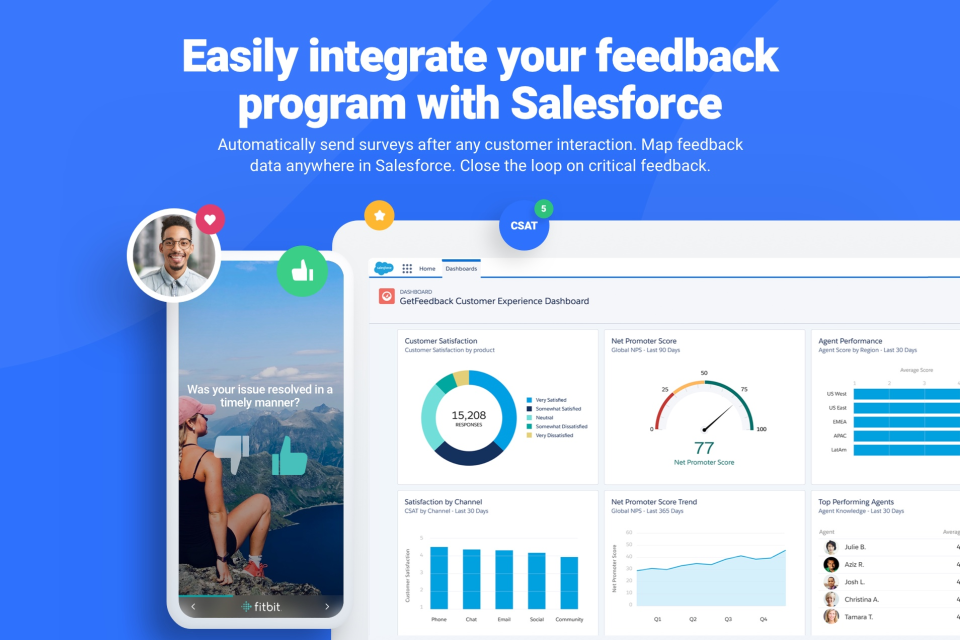
8. GetFeedback

A feedback tool that integrates deeply with Salesforce, enabling real-time capture of customer feedback and connection to CRM workflows.
AI Features:
- Automated workflows based on survey responses
- Ability to escalate negative feedback automatically within CRM system
Top Features:
- NPS/CSAT measurement; branded surveys
- Direct integration with Salesforce
- Dashboards and role-based access
Best For: Service organizations or enterprises already using Salesforce as their core customer platform and looking to link feedback to action.
Pros:
- Tight Salesforce integration
- Streamlined for service feedback
- Actionable workflow options
Cons:
- Mainly optimized for Salesforce users
- Less cost-effective for small local businesses without CRM investment
Pricing:
- Custom pricing
- Contact sales for quote
9. UseResponse

A feedback and help-desk suite that combines suggestion/voting portals, customer feedback collection and ticketing into one platform.
AI Features:
- Automated tagging of suggestions
- Prioritisation based on votes or themes
- Analytics on idea lifecycle.
Top Features: Customer suggestion forum, voting on feature/idea requests, ticketing integration, analytics for idea prioritisation.
Best For: Product-led businesses or service organizations that receive frequent customer suggestions and need to manage idea-to-implementation workflows.
Pros:
- Combines feedback and support
- Democratic suggestion up-voting
- Strong for idea management beyond simple surveys.
Cons:
- Less optimized for purely in-store brick-and-mortar local businesses
- May require setup and training
Pricing: Starting around $49/month for small setups (depending on seats/features).
10. Nicereply

A feedback tool built for support teams, collecting CSAT, CES and NPS scores post-interaction and linking to agent performance and service workflows.
AI Features:
- Automatically tags feedback by sentiment
- Correlates feedback with agent performance
- Real-time alerts for negative responses.
Top Features:
- Integration with help-desk tools (Zendesk, Freshdesk, Help Scout)
- Feedback surveys embedded in email
- Dashboards by agent/team
- Automated follow-up
Best For: Service-based businesses or parts of local businesses (salon chains, hotel front-desk teams) that want to link individual service interactions to feedback and improvement.
Pros:
- Service-team oriented
- Easy embedding
- Good for measuring customer-service performance
Cons:
- Focused primarily on interaction feedback rather than general product/service suggestion feedback
- May not cover broad touchpoint collection
Pricing: From around $39/user/month or scales based on agents and volume.
11. Wootric
A feedback platform specializing in micro-surveys (one to three questions) that measure metrics like NPS, CSAT and CES across multiple channels.
AI Features:
- Automated sentiment analysis
- trending insights
- Ability to trigger workflows based on response
Top Features:
- Deploys quick short surveys via email, web, mobile apps
- Real-time dashboards
- Ability to set thresholds and automatic follow-up
Best For: Businesses that want high-response-rate, low-effort feedback systems to monitor satisfaction and loyalty over time.
Pros:
- Lightweight, fast implementation
- Good for continuous measurement
- Low friction
Cons:
- Less suited for large-scale open-ended feedback or detailed idea-capture
- Focuses on metrics rather than full-scale feedback collection
Pricing: Free plan available; custom pricing for enterprise volumes (based on number of responses).
12. Qualtrics XM

A robust enterprise experience management platform covering customer, employee, product and brand feedback at scale.
AI Features:
- Advanced predictive analytics, sentiment drivers, experience optimization algorithms
- Connects feedback to business outcomes
Top Features:
- Full-scale survey and feedback management
- Text analytics
- Dashboards
- Workflow automation
- Integration with many enterprise systems
Best For: Large organizations with multi-channel feedback needs, complex customer journeys, and desire to tie feedback into financial/operational metrics.
Pros:
- Extremely powerful, highly customizable
- Covers many touchpoints and feedback types
- Enterprise-grade security and scalability.
Cons:
- High cost
- Complexity may be overkill for smaller or local businesses
- Requires significant resources to implement
Pricing: Custom pricing; typically high (enterprise tiers) depending on modules and response volume.
13. Google Forms

A free tool from Google for creating surveys and forms quickly; good for basic feedback needs and low cost entry.
AI Features: Limited native AI features; relies on Google Sheets + add-ons for advanced analytics.
Top Features:
- Completely free
- Unlimited forms
- Integrates with Google Sheets for analysis
- Easy to use for beginners
Best For: Small businesses or beginners who want to start collecting feedback with no cost and minimal learning curve.
Pros:
- Free, very simple to set up;
- Integrates with Google ecosystem
Cons:
- Very limited in analytics, branding, workflow automation;
- No advanced segmentation or native survey logic beyond simple branching.
Pricing: Free.
14. UserReport

A website feedback and audience-analytics tool offering both surveys and visitor demographic segmentation; good for small businesses on a budget.
AI Features:
- Basic analytics
- Tagging to identify visitor segments
- Some automation for reporting
Top Features:
- Feedback and survey widgets for websites
- Demographic and visitor-profile enrichment
- Free tier for entry usage.
Best For: Small websites, blogs, local businesses with minimal budget wanting to gather visitor feedback and simple demographic insights.
Pros:
- Free plan available
- Visitor segmentation adds context to feedback
- Lightweight
Cons:
- Not as feature-rich or deeply integrated as dedicated feedback platforms
- Works best for online feedback rather than in-store physical touchpoints.
Pricing: Free plan available; paid tiers for more responses and features.
15. Feedbackify

Feedbackify is a simple widget-based feedback collection tool that allows website visitors to send comments, suggestions, and ratings without leaving the page.
AI Features:
- Basic feedback tagging and sentiment recognition
- Automated categorization of responses
- Simple analytics dashboard for quick summaries
Top Features:
- Easy-to-install website widget
- Anonymous feedback submission
- Real-time response notifications
- Customizable feedback forms
- Export options for reports
Best For: Small and local businesses that want a no-fuss way to collect website or service feedback without heavy setup.
Pros:
- Very simple setup and use
- Affordable pricing
- Works seamlessly on websites
- Encourages more honest feedback due to anonymity
Cons:
- Limited analytics
- No mobile app
- Lacks integrations with CRMs or other systems
Pricing: Starts with a free trial, paid plans available from US $19/month.
16. Formstack Surveys

Formstack Surveys is a drag-and-drop form and survey builder that offers advanced logic and workflows, designed for businesses that need custom data collection and routing.
AI Features:
- AI-assisted form suggestions
- Smart branching and logic templates
- Response prediction and auto-tagging
Top Features:
- Drag-and-drop form builder
- Conditional logic and workflows
- Secure data routing
- Custom branding and themes
- Wide range of CRM integrations
Best For: Businesses that need customizable survey forms with data workflows and automation; ideal for integrating feedback directly into operations.
Pros:
- High flexibility and customization
- Advanced data workflows
- Good integration options
Cons:
- Steeper learning curve for beginners
- Higher pricing than many small-business tools
- No permanent free plan
Pricing: Starts at approximately US $83/month, billed annually.
17. SurveySparrow

SurveySparrow offers conversational, chat-style surveys and feedback tools that make the feedback process more engaging and human-like.
AI Features:
- AI-driven sentiment analysis
- Smart logic and branching
- Automated response management
Top Features:
- Conversational surveys for web and mobile
- Custom branding and design
- Email, in-app, and web sharing options
- Integration with major CRM tools
- Analytics and reporting dashboard
Best For: Local and mid-sized businesses that want to increase response rates through engaging, interactive survey formats.
Pros:
- Highly engaging survey style
- Multi-channel support
- Scalable across business sizes
Cons:
- Limited free plan
- Advanced features require higher-tier plans
- Analytics can be less robust for enterprise users
Pricing: Starts at around US $19/month, billed annually.
18. AskNicely

AskNicely focuses on Net Promoter Score (NPS) and customer loyalty measurement, designed for businesses that prioritize experience and repeat engagement.
AI Features:
- Automated survey workflows
- AI-driven insights and trend detection
- Real-time alerts based on sentiment
Top Features:
- NPS/CES/CSAT surveys
- Automated follow-up workflows
- Integrations with Slack, Teams, and CRMs
- Role-based dashboards
- Testimonial generation tools
Best For: Customer-centric companies such as hotels, gyms, service centers, and salons that rely on recurring customers.
Pros:
- Excellent for loyalty measurement
- Deep integration with communication tools
- Encourages quick response to customer concerns
Cons:
- Custom pricing may be costly for smaller businesses
- Advanced analytics locked behind higher plans
- Better suited for larger teams
Pricing: Custom-based pricing starting at volume-based tiers (around 500 responses/year).
19. InMoment
InMoment is an enterprise-level experience management platform offering advanced analytics and multichannel feedback for large organizations and franchises.

AI Features:
- Predictive analytics for feedback trends
- AI sentiment and text analysis
- Business outcome mapping based on feedback
Top Features:
- Multichannel feedback collection (web, app, in-store)
- Deep analytics and performance dashboards
- Multi-location management
- Role-based access and reporting
- Enterprise-grade integrations
Best For: Large retail, hospitality, or franchise businesses that operate across multiple locations and need unified feedback insights.
Pros:
- Highly scalable
- Powerful analytics and reporting
- Suitable for complex business ecosystems
Cons:
- Expensive for small and medium businesses
- Requires training or setup support
- May be overkill for single-location stores
Pricing: Custom pricing on request.
20. Feedier

Feedier combines survey, gamification, and analytics into one platform, helping small and growing businesses collect feedback and motivate customers to share experiences.
AI Features:
- Automatic sentiment tagging
- AI-driven insight generation
- Smart feedback categorization
Top Features:
- Multi-channel feedback collection (QR, web, email)
- Gamified survey experience
- Segmented dashboards and insights
- Real-time analytics
- Integration with business tools
Best For: Local businesses like restaurants, salons, and hotels seeking an engaging and affordable feedback solution.
Pros:
- Fun, interactive feedback experience
- Good for customer engagement
- Free plan available
Cons:
- Advanced analytics only on paid plans
- Limited integrations in lower tiers
- Smaller support community
Pricing: Free plan available; paid plans start from around US $30/month.
How to Choose the Right Feedback Tool for Your Business
Selecting the right feedback software depends on your goals, team size, and resources. Below are the main factors to consider:
Match Features to Your Business Type
Local businesses may need tools like Insight IQ Hub or Feedier that simplify QR feedback and in-store engagement. Larger enterprises should consider Qualtrics XM or InMoment for their scalability and analytics capabilities.
Budget Considerations
Free tools such as Google Forms and UserReport are excellent for testing initial feedback processes. As your customer base grows, upgrading to paid plans unlocks automation and deeper insights.
Integration Needs
A good feedback tool should integrate with your CRM, POS system, or website analytics platform. For instance, HubSpot Service Hub and AskNicely connect directly with existing CRM workflows, ensuring feedback leads to action.
Channel Coverage
Choose a platform that meets customers where they are; in-store, online, mobile, or email. Tools like Insight IQ Hub and SurveySparrow offer omnichannel coverage that captures a full customer journey.
Actionable Insights
The best customer feedback software isn’t just about collecting data. It’s about transforming those insights into real decisions. Platforms with real-time dashboards and automated reporting help ensure that customer ideas continuously drive business growth.
For real-world examples, you can explore Insight IQ Hub’s case studies showcasing how businesses increased retention, improved service quality, and built stronger customer relationships through feedback.
Best Practices for Implementing Feedback Tools
1. Launch Checklist
Start by defining your goals, selecting your preferred channels, and ensuring your team understands how to use the tool. Promote your feedback initiative through signage, QR codes, and digital communication.
2. Encourage High Response Rates
Timing and simplicity are everything. Ask for feedback soon after an experience and keep surveys short. Offering small incentives such as loyalty points or discounts can increase participation.
3. Analyze Results
Use segmentation and tagging to categorize responses by product, branch, or service type. This helps prioritize issues and identify recurring themes.
4. Act on Insights
Assign feedback ownership to team leads, implement pilot solutions, and communicate updates back to customers. Showing that you acted on feedback builds trust and brand loyalty.
5. Monitor ROI
Track how feedback impacts metrics like retention, repeat business, and review ratings. Use dashboards to measure revenue growth tied directly to feedback-driven decisions.
For instance, check out this Insight IQ Hub case study to see how a Domino’s Pizza improved service and boosted revenue by acting on customer suggestions.
Conclusion
In 2026, customer feedback tools and software have evolved from simple survey systems into full-scale business growth engines. Whether you’re a small salon or a large hospitality brand, the right tool can transform opinions into outcomes.
Start simple; tools like Insight IQ Hub offer free and paid plans designed for local businesses that want to collect in-store feedback through QR codes and dashboards. As your business expands, explore other options like Qualtrics XM or InMoment for enterprise-grade analytics.
The key is to take action on the data you collect. Each response represents an opportunity to improve service, increase loyalty, and grow your business.
Ready to start? Explore these tools, test a few, and commit to a feedback strategy that turns customer ideas into measurable business growth.
Which of these tools are you going to apply to your business? Drop a comment and let us know.
Frequently Asked Questions
1. What is the best customer feedback tool for small businesses?
For small and local businesses, Insight IQ Hub, Google Forms, and SurveySparrow are great starting points. They offer free or affordable plans, easy setup, and simple ways to collect customer feedback both online and in-store. As your business grows, you can upgrade to advanced tools like Typeform or AskNicely for more automation and analytics.
2. How do I choose the right feedback software for my business?
Start by identifying your main goals: do you want to measure satisfaction, collect reviews, or improve service? Then consider:
- Budget – Free vs. premium tiers
- Integrations – Does it connect with your CRM, website, or POS?
- Channels – Online, mobile, or in-person feedback
- Analytics – How actionable are the insights?
Local businesses should prioritize tools that are simple, mobile-friendly, and easy for customers to use on the go.
3. What are the main benefits of using customer feedback tools?
Customer feedback tools help you:
- Improve customer satisfaction and loyalty
- Identify service or product gaps
- Increase review ratings and retention
- Make data-driven business decisions
- Streamline your feedback loop by automating surveys and analysis
Ultimately, feedback tools turn customer opinions into actionable insights that help your business grow faster.
4. Are there free customer feedback tools available?
Yes, many tools offer free plans or trials. Options like Google Forms, Zoho Survey, and Feedbackify provide essential features for free, making them ideal for startups and small local businesses. Free versions are great for getting started, while paid upgrades unlock automation, integrations, and deeper analytics when you’re ready to scale.